Valve released a new Steam client beta update today. The software patch brings a fresh set of visual options and navigation tools to SteamOS devices and Big Picture Mode setups. Users can now test these features by opting into the beta branch through their hardware settings.
Big Art Layout
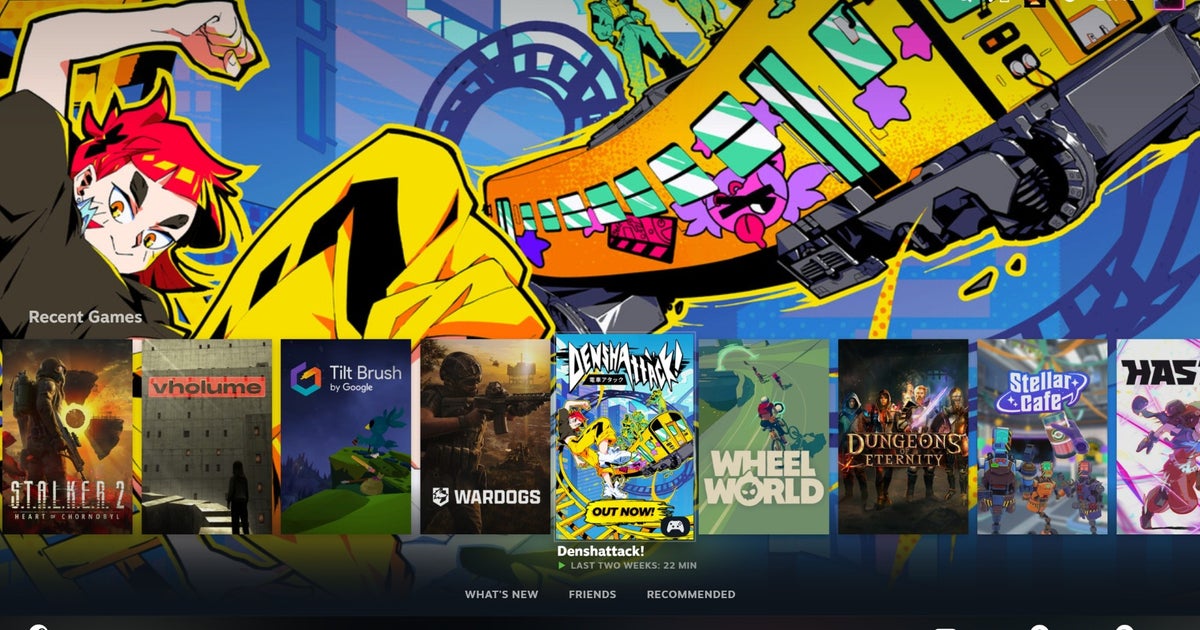
The home screen receives a new display option called Big Art mode. This layout emphasizes high-resolution cover graphics and background artwork for individual titles in the library. Navigation changes to accommodate the larger visual elements. Players see more prominent artwork when browsing their installed games and recent titles. The interface scales these images to fit handheld screens and living room displays.
Custom Screensavers
Valve added native screensaver support to the interface. Users can configure the system to display official game artwork during periods of inactivity. A retro option replicates the classic bouncing DVD logo using the modern Steam icon. These screensavers activate after a set time limit during sleep states or idle navigation in the main menu.
Boot Options and Proton
The update introduces direct control over startup behavior. Users can set their Steam Deck to boot straight into Desktop Mode instead of the standard gaming interface. This removes an extra step for players who use the Linux desktop frequently.
The compatibility menu also receives a minor informational adjustment. The system now displays the active Proton version directly inside the game properties tab. Players no longer need to dig through submenus to see which compatibility layer handles a specific title.
These changes are currently live in the client beta branch. Valve gathers user feedback before pushing these interface updates to the stable release channel for all owners.
This iterative development process allows Valve to fine-tune the performance of the newly introduced visual layouts and system toggles under real-world conditions. Early adopters testing the beta branch play a crucial role in identifying edge cases, particularly regarding how the Big Art home screen scales across varying display resolutions, from the native panel of the Steam Deck to large 4K televisions connected via docking stations.
The inclusion of the retro bouncing Steam logo also taps into community nostalgia, offering a playful nod to classic media player animations while demonstrating the software's flexibility in handling legacy-style graphics. Meanwhile, the streamlined access to the active Proton version within the compatibility tab represents a thoughtful quality-of-life improvement for power users. By surfacing this translation layer data directly in the properties menu, troubleshooting game-specific performance issues or testing alternative Proton experimental builds becomes significantly faster and more transparent for the average player.
Players evaluating the updated client can select these preferences manually through the system settings menu once the beta package is downloaded and installed. Specifically, the toggle for bypassing the default gaming UI and initiating a direct Linux desktop session is located under the newly expanded General tab of the client settings, requiring a complete system reboot to take effect.